
One+ ‘The’ ultimate All in One Garmin Application Supports over 100 Activities and Sports.
How to Use
Select Activity Type and press start. When complete press Start button again to enter Save/ Exit menu.
Outdoor Activities will Enable GPS and normal lapping By Position, By Distance or a Manual Lap button press. Satellites Options can be set or Overridden to OFF at the Start Menu.
Indoor Activities will Disable GPS and lapping By Position and By Distance. Satellites Options can be set or Overridden to ON at the Start Menu.
Battery Saving options shown with <best battery>
One+ requires GPS lock before starting activity wait for GREEN GPS on splash screen before starting activity. Using Lap Method: AutoLap By Position will not start activity until activity. Special audible alert is used and screen text to indicate GPS sensor is not ready.
Global Navigation Satellite System (GNSS) Settings:
- GPS (GPS): Single-GNSS GPS System
- +GLONASS (GPS+GLONASS): Dual Band-GNSS L1: GPS and GLONASS Systems (CIQ 3.2+)
- +GALILEO (GPS+GALILEO): Dual Band-GNSS L1: GPS and GALILEO Systems (CIQ 3.2+)
- +BEIDOU (GPS+BEIDOU): Dual Band-GNSS L1: GPS and BEIDOU Systems (CIQ 3.3.6+)
- GNSS L1: (GPS,GLON,GALI,BEI): Multi-Band GNSS L1: GPS, GLONASS, GALILEO and BEIDOU Systems (CIQ 3.3.6+)
- GNSS L5: (GPS_L5,GLON,GALI_L5,BEI_L5): Multi-Band L5: GPS, GLONASS, GALILEO and BEIDOU Systems (CIQ 3.3.6+)
- AutoGNSS (AutoGNSS(SatIQ)): Garmin’s Multi-Band GNSS option. Saves battery at High GNSS Resolution (CIQ 3.3.6+)
- If your device supports,
- I recommend GNSS L1 setting. (Default for CIQ 3.3+ devices)
- For CIQ 3.2, I recommend +GALILEO (Default for CIQ 3.2 devices)
- <For best battery>, use Single GNSS: GPS only.
Supported Sensors (ANT+/BLE)
- HeartRate (Internal / External)
- Oxygen Saturation (Internal / External SaO2) (Defaulted OFF)
- Temperature (Internal/Tempe)
- RunPod
- Footpod (Walking, Running and )
- Cycle Power
- Cycle Cadence
- Cycle Speed
- Paddle Cadence
Best Performance
- Use better GNSS option
- Improved Calories and Heart Rate Graphs use ANT+ External Heart Rate Monitor
- Use ANT+ External sensors
- Data Recording to Every Second.
- Set at Main Menu>Settings>System> Data Recording. Set to Every Second.
- Every Second – saves all data every second. this option will consume some battery and results in larger FIT Files. I tested very large activities with no issues. (Recommended)
- Smart Recording – (FACTORY DEFAULT) saves to FIT File as important data changes. This option will loss data.
- Set at Main Menu>Settings>System> Data Recording. Set to Every Second.
Start Screen
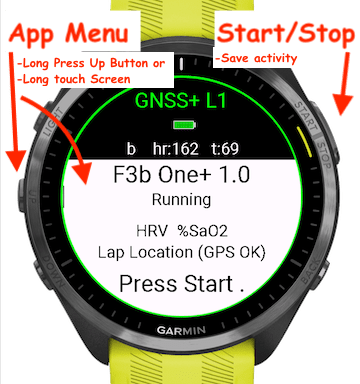
Start Screen Menu
- Favorites – Menu
- Quick Shortcut – Saves the Last 5 Activities
- Shows after an activity is selected.
- Select Activity Menu (sorts by type)
- Run/ Walk
- Cycling
- In Water (Swimming/ Diving)
- On Water (Rowing, Sailing )
- In Air (Flying, HandGliding)
- Motor Sports (Driving, ATV)
- Racket Sports (Tennis, Pickleball, Padel)
- Team Sports (Soccer, Baseball..)
- Gym and Fitness (Weight lifting, Yoga)
- Winter Sports (Skiing, Snowshoeing)
- OutdoorSports (Hiking, Hunting, Fishing)
- Other (Generic (Other Activity) option)
- Lap Method Menu
- Off – Disables Lap button and all lapping
- Manual Lap – Enables Manual only laps
- Lap Distance – Auto Laps by Distance (Accuracy 0.01) (Uses Watch Distance units)
- Auto Location – only available in supported watches.
- AutoLaps when passing the start location.
- Creates Map Lap Box (Mapping devices only)
- 2 Lap Box sizes Small and Large set in Configuration Settings
- GPS Options Menu
- Will Override current setting
- Options
- Off
- Single Band – GPS
- Dual Band -GPS+GLONASS
- Dual Band – GPS+GALILEO
- Dual Band – GPS+BEIDOU
- Multi Band – L1 All Systems at Level 1
- Multi Band – L5 All Systems at Level 1 and Level 5 (Fastest and Highest Resolution)
- Multi Band – AutoSat IQ – Garmin’s feature GPS option
- %SaO2 Sensor
- Enable/Disable SaO2 Sensor (requires app restart)
- Unlock Page – Unlock app from Watch (requires Garmin Connect Mobile App on phone)
- Purchase Page – QR code to help pages
- Use phone camera
- Garmin Connect Mobile App will ask to open purchase page
- Help Page
- Use phone camera
- Garmin Connect Mobile App will ask to open Help pages
In App Settings and Buttons


- Lock – locks buttons and screen from unwanted presses
- long press and unselect to turn off /on
- Theme – Dark – Light
- AutoScroll – scrolls the screen every 6 seconds.
- If Maps are supported, Does not scroll to Map Page
- Heart Rate – Use rrHR or Garmin HR
- Start/Stop Button, enters Pause, Save and Exit menu
- Lap Button –
- Short Press – Lap is enabled, will generate manual lap
- Long Press – to Garmin Clock/ Widgets
- Up/Down buttons – Page Scroll
- Power Button – Long Press to Garmin Controls Menu
Configuration Settings (Use Garmin IQ Store or Garmin Express)
- Unlock
- Settings Application and Version – values should match
- Expiration field
- Purchase Email Unlock Field
- Enter Purchase Email Only
- Using different or wrong email will not unlock!
- Update Fbbbrown License button – Use button to renew license, pull in new date ore to unlock
- Epoch and Registered email (Read Only fields)
- Application Settings
- Select Activity
- GPS
- Lap Method
- Auto Location Box Size
- Lap Distance
- Pool Size in Meters (25 yds = 22.86 meters)
- Elevation/Altitude Alarm in Meters
- Value in Mean Sea Level (MSL),
- Uses watch units Meters or Feet)
- App will alarm when below the entered value(Sound Vibration and Flashing Red Screen)
- Only available with In-Air activities.
- Additional Gear Weight (in Kg)
- Used for Alternate Calorie Calculations adds Gear + User Profile weight.
- Use HRV calculations
- Enables HRV Graphs and Data, Required for rrHR Rate
- Use rrHR Rate button
- Replaces Garmin Heart Rate with rr Heart Rate.
- Use % Oxygen Saturation Sensor
- Screen and Data Settings
- AutoScroll – value in seconds, 0 = Off. 6 seconds recommended.
- Theme – (Select Dark or Light)
- Screen Selections (Data Values)
- Summary First Screen: (2 fields) Bottom Left and Right
- Second Screen: (3 fields) Top, Bottom Left and Right
- Third Screen: (2 Large fields) Top and Bottom
- Fourth Screen: (1 Extra Large field)
- Data Values
- Speed /Pace
- Average Speed
- Distance
- Elapsed Time
- Garmin Calories
- Adjusted Calorie (Averaged Heart Rate)
- Instantaneous Calorie Sum (Heart Rate)
- Energy Expenditure (Cal/Hr)
- Training Effect (What is TE)
- 0.0 – 5.0 Scale
- 0 – None,
- 1 – Minor,
- 2 – Maintaining,
- 3 – Improving,
- 4 – Highly Improving,
- 5 – Overreaching.
- 0.0 – 5.0 Scale
- Workout Effort Points
- Points are earned by exercising in your target heart rate zones over a period of time. The more effort you put into each of your workouts, the more WEP earned
- Workout Effort Point (WEP) System Similar to other point systems
- HR Zone 0 – 0-49% Heart Rate, No Points
- HR Zone 1 – 50-59% Heart Rate (Gray), 1 Points per minute
- HR Zone 2 – 60-69% Heart Rate (Blue), 2 Points per minute
- HR Zone 3 – 70-79% Heart Rate (Green), 3 Points per minute
- HR Zone 4 – 80-89% Heart Rate (Orange), 4 Points per minute
- HR Zone 5 – 90-100% Heart Rate (Red), 4 Points per minute
- Heart Rate
- HR Zone 0 – 0-49% No Color
- HR Zone 1 – 50-59% Heart Rate, Gray
- HR Zone 2 – 60-69% Heart Rate, Blue
- HR Zone 3 – 70-79% Heart Rate, Green
- HR Zone 4 – 80-89% Heart Rate, Orange
- HR Zone 5 – 90-100% Heart Rate, Red
- Average Heart Rate
- Minimum Heart Rate
- Maximum Heart Rate
- % Oxygen Saturation
- Breathing Rate
- Temperature (Watch)
- Tempe (ANT Sensor)
- Steps
- Battery Used %
- Lap Count
- Lap Time
- Last Lap Time
- HRV
- HRV Difference +/-
- Heart Monitor Abnormal Beats (xhr)
- Altitude / Elevation
- Total Ascent
- Total Decent
- Average Cadence
- Cadence
- Current Power
- Average Power
Supported Activities
- Generic
- Run Walk
- running
- treadmill
- streetRun
- trailRun
- trackRun
- indoor running
- walking
- indoor walking
- casual walking
- speed walking
- inline skating
- rock climbing
- rock indoor climbing
- rock bouldering
- floor climbing
- floor bouldering
- Cycling
- cycling
- spin
- indoor cycling
- road cycling
- mountain cycling
- downhill cycling
- recumbent
- cyclocross
- hand cycling
- track cycling
- bmx
- gravel cycling
- e bike mountain
- commuting
- mixed surface
- e biking
- In Water Sports
- swimming
- lap swimming
- open water
- diving
- single gas diving
- multi gas diving
- gauge diving
- apnea diving
- apnea hunting
- On Water Sports
- rowing
- kayaking
- whitewaterk
- rafting
- whitewaterr
- sailing
- stand up paddleboarding
- surfing
- wakeboarding
- water skiing
- boating
- paddling
- windsurfing
- kitesurfing
- water tubing
- wakesurfing
- In Air Sports
- flying
- rc drone
- wingsuit
- jumpmaster
- sky diving
- hang gliding
- Motor Sports
- motorcycling
- atv
- motocross
- snowmobiling
- driving
- Racket Sports
- tennis
- squash
- pickleball
- padel
- badminton
- Team Sports
- golf
- basketball
- soccer
- american football
- baseball
- softball
- field hockey
- lacrosse
- cricket
- rugby
- disc golf
- ultimate disc
- gaming
- Gym and Fitness
- training
- strength training
- HIIT (High Intensity Interval Training)
- yoga
- flexibility training
- cardio training
- fitness equipment
- indoor rowing
- elliptical
- stair climbing
- indoor skiing
- pilates
- boxing
- Winter Sports
- ice skating
- cross country skiing
- skate skiing
- alpine skiing
- Back Country alpine skiing
- Resort alpine skiing
- snowboarding
- Back Country snowboarding
- Resort snowboarding
- snowshoeing
- Outdoor Sports
- hiking
- mountaineering
- horseback riding
- hunting
- archery
- fishing
- tactical