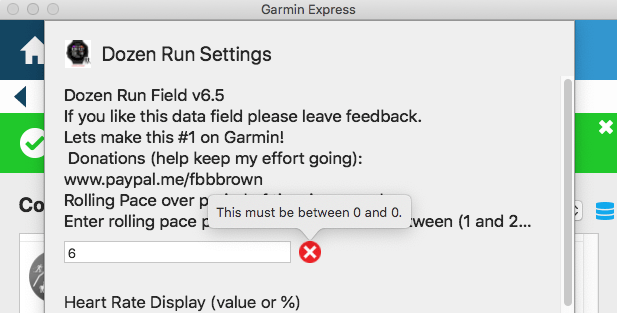
NOTICE: Currently there is an error in Garmin Connect Mobile (GCM) that will not allow you save your email address to unlock your application. The CIQ APP saving function is saving a text file to the watch, when it should be saving a special file that the apps can read. This is affecting all CIQ apps including mine.Please, use the following instructions to unlock your application.
UPDATE AUG 29: Garmin Released Connect Mobile App (4.22.11) the problem was not addressed.
UPDATE AUG 27: Garmin has responded and is currently working this issue. Below is a solution until Garmin posts the update.
Please use these instructions, they are slightly different and require two (2) Garmin applications GCM and Garmin Connect IQ Store (GCIQS) applications.
Download the Garmin Connect IQ Store App. iPhoneAndroid
Updated Unlock Instructions:
So, with that information how to resolve your issue is.
First we need to remove the bad settings file by Uninstalling the apps that you cannot unlock, restart the watch and then reinstall using Garmin Connect IQ store app.
The restart will remove the bad settings file.
Have the program Garmin Connect Mobile App (GCM) open and with access to the internet. Open the background of your phone.
Have the fbbbrown app at the “Start Screen” with the ‘b’ (the ‘b’ indicates the watch is connected to the phone GCM), then
Then Using Garmin Connect IQ Store (GCIQS) App to enter your email*, uncheck(OFF) the Verify/Validate button, then Save.
Wait at the fbbbrown app start screen until the Red Bar disappears. (3-10 seconds) *NOTE: All Epix users and only my HeartMonitor (datafield) still use the code/email.
If you are having a problem. -Give your watch a restart and check if the email/code are entered correctly. Sometimes the email/code do not save the first time after a new install or update. -If you still have an issue, there is an option in settings to ‘Default Application’. Set to ON, save and start the App. Then enter your email again.
BikeSafe+ (June) and SwimSports+ (July) are ready for release. These Apps features many Activity Type supports and activity specific features that will separate you from your competition. BikeSafe+.
BikeSafe+ Features:
8 activity support (Cycling, MTB, BMX, CycloCross,Spinning, Indoor, Hand Cycling and Commuting )
Safe Alert Notifications (Email and SMS)
HRV, Heart Monitor and Recovery (CIQ 3.0)
Transitions for total workout information (CIQ 2.0)
Estimated Power, Normalize power and FTP.
% Grade
IQ Graphs and Data
Sensor Support (cadence, power, speed and temperature)
AutoLap for advanced interval lapping (Distance or Position)
Mapping on supported devices
42 Data options on 4 screens
SwimSport+ Features:
4 activity support (Open Water, Lap Pool, Stationary swimming and AquaSports )
3 LARGE screens, rest summary screen
Transitions for total workout information (CIQ 2.0)
IQ Graphs and Data
Sensor Support (Optical HR* and ANT HR post download)
Optical HR will use ‘Other’ Activity Type.
AutoLap for advanced interval lapping (Distance or Position)
There is a new tool to install Garmin Connect IQ Apps for available in Google and Apple App stores “Connect IQ Store”. It is so easy to use. I suggest to use over Connect and Express!
I’ve been working hard to bring this update to all my apps. This feature will reduce setup, and remove code/email system.
NO MORE CODES!
The new system is secure*, backwards compatible, self-learning, and forward compatible.
Existing users will get an app update, enter their code one last time, the app will validate the email/code and that’s it. Do this for each app or once with the all apps code. After validated, no code is necessary, just enter your validated PayPal email.
New users will still get a code but will not need to enter the code, just enter your PayPal email. System will validate and enter the unlock code automatic.
Older Email/Code is still supported for EPIX user and all other devices who received codes.
How to use:
If your watch connected to the INTERNET, enter your PAYPAL email in to the Yellow Circle (shown below).
With Garmin Connect App running on your phone, start the Sports+ app with Garmin Connect APP running on the Phone, at the start screen THE RED BAR will automatically be removed if your purchase was for Sports+ and using your PAY PAL email.
If the BAR is not removed and receive a CODE listed below, enter PayPal email/code with and it will unlock. No code will be needed again.
The Splash Screen will have new Error Codes
No Internet Access – Phone is not connected to the Internet
-1 watch has not connected to internet
-2 code expired. See Terms and Conditions. (link Below)
-3 your code is not authorized for this app. Enter code in settings or purchase app.
-4 Email not found at fbbbrown, Enter code in settings.
-9 other
404 Connected to Phone, and Phone has not internet access.
When registered the FB3 Web Verified Check Box will be true (checked) (Red Circle). Uncheck to reregister or expired.
Expiration Date (blue Circle)
-Existing users Duration of Use** will be 4 years from original purchase date, after Duration of Use** will be yearly recurring.
-New Users after May 1, 2019, Prices will be yearly recurring (Subscription): Individual App (99 cents) or ALL APPs Price (4.50 USD) (0.25 x Number APPs).
How to use EPIX:
EPIX: Same as before. enter your PAYPAL email and CODE (Green Circle) with Connect App running on your phone or Garmin Express.
We use cookies to optimize our website and our service.
Functional
Always active
The technical storage or access is strictly necessary for the legitimate purpose of enabling the use of a specific service explicitly requested by the subscriber or user, or for the sole purpose of carrying out the transmission of a communication over an electronic communications network.
Preferences
The technical storage or access is necessary for the legitimate purpose of storing preferences that are not requested by the subscriber or user.
Statistics
The technical storage or access that is used exclusively for statistical purposes.The technical storage or access that is used exclusively for anonymous statistical purposes. Without a subpoena, voluntary compliance on the part of your Internet Service Provider, or additional records from a third party, information stored or retrieved for this purpose alone cannot usually be used to identify you.
Marketing
The technical storage or access is required to create user profiles to send advertising, or to track the user on a website or across several websites for similar marketing purposes.


 Download the Garmin Connect IQ Store App.